Project Management in PLM.
Connect the plan to the product.
Plan product development with integrated project management in Nora IPLM. Connect tasks, milestones, and deliverables with product data, from the first activity to the final release.
Project management.
The whole picture.
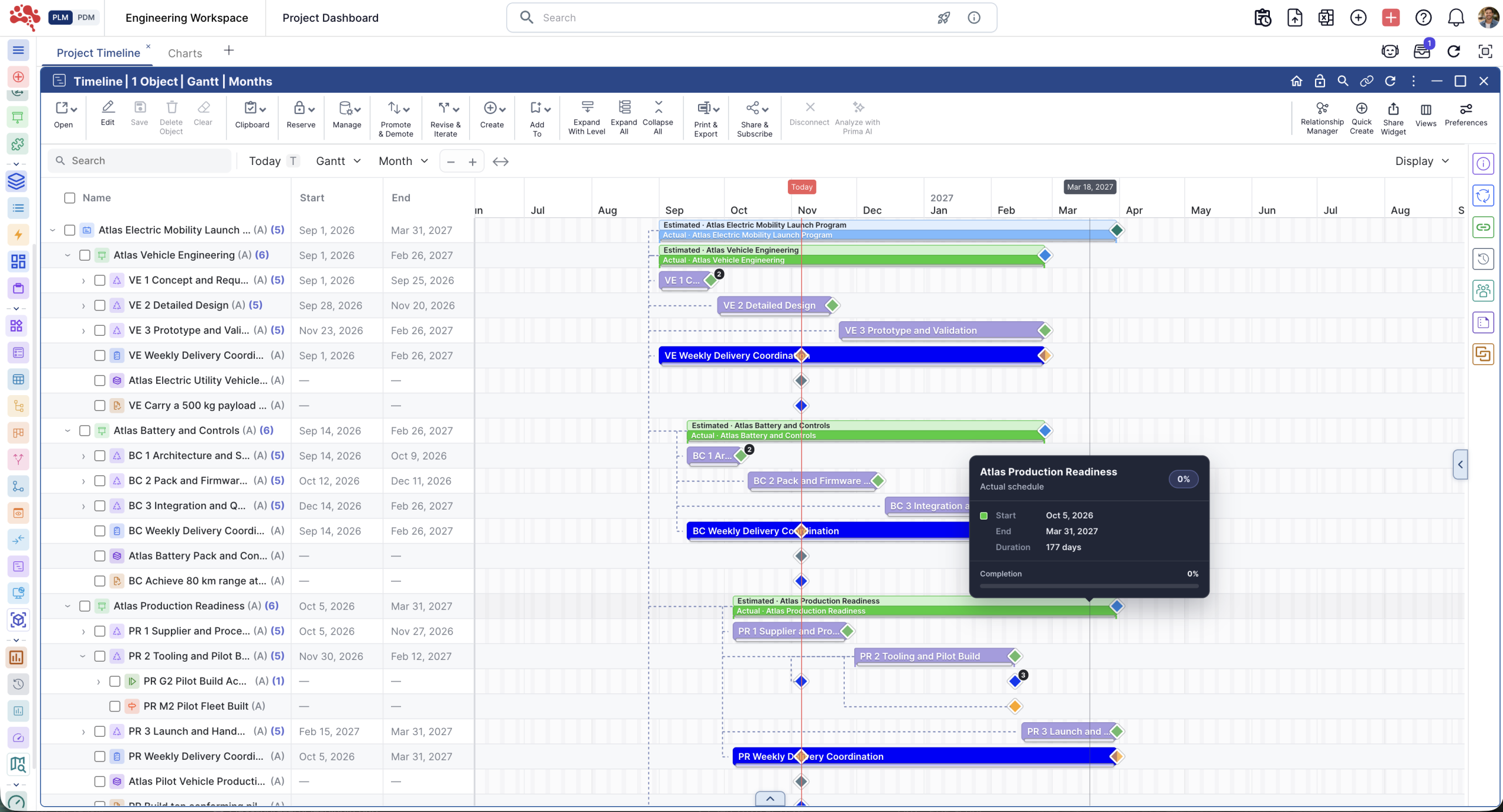
Integrated project management in PLM connects project plans, tasks, milestones, and dependencies with product data, engineering deliverables, and lifecycle processes. Review the schedule and the product work behind it together.
A clear plan.
A connected team.
Organize programs, phases, and activities in one place. Give every task an owner and connect the work to the product it supports.
Every task.
Its wider context.
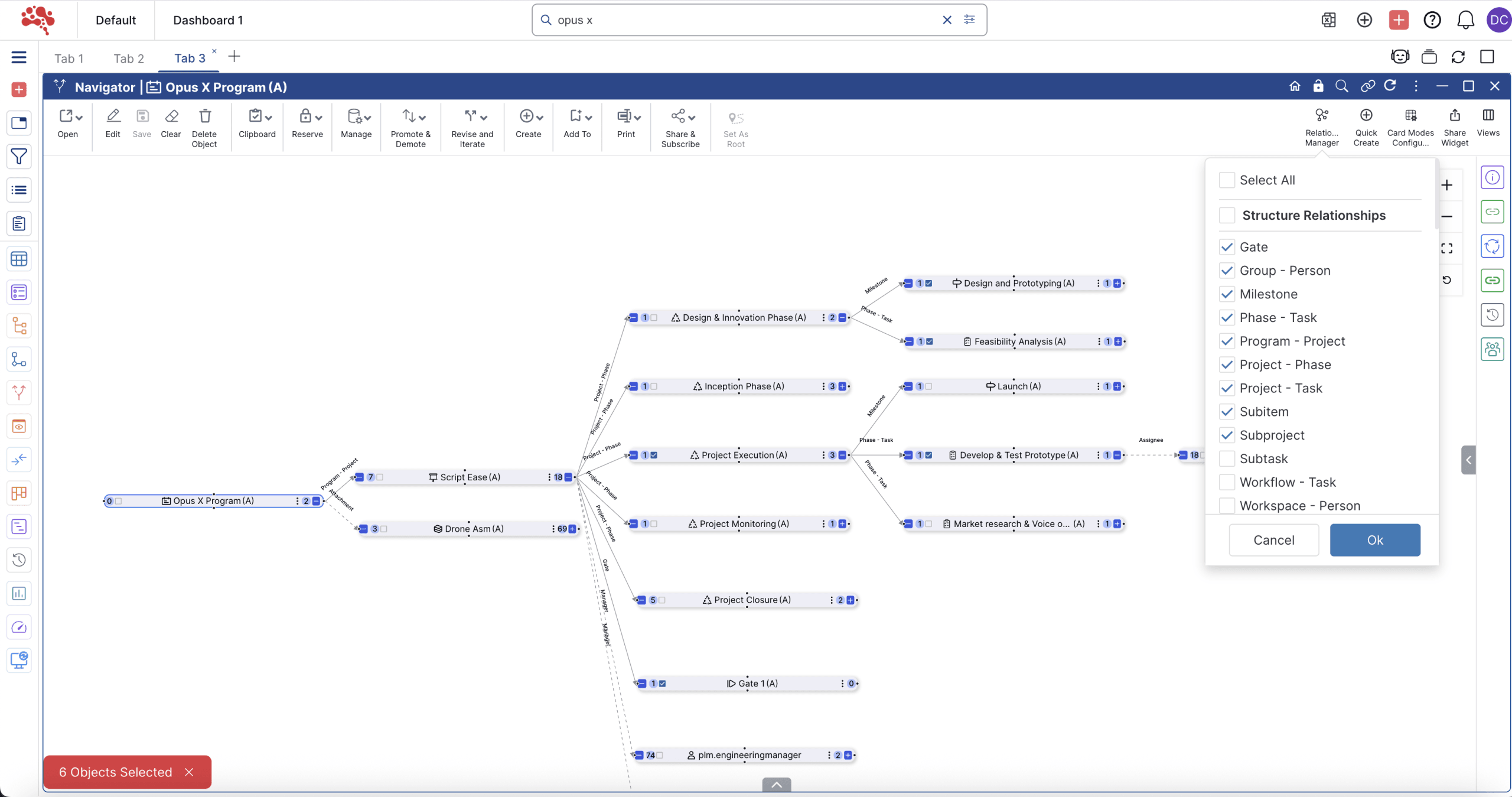
Link activities with requirements, BOMs, documents, and changes. Follow dependencies to understand which work needs to happen first.

The next checkpoint.
The work behind it.
Connect phases, milestones, tasks, and deliverables. Keep owners and target dates visible as teams work toward design reviews, prototypes, and release.
See the progress.
Find the hold-up.
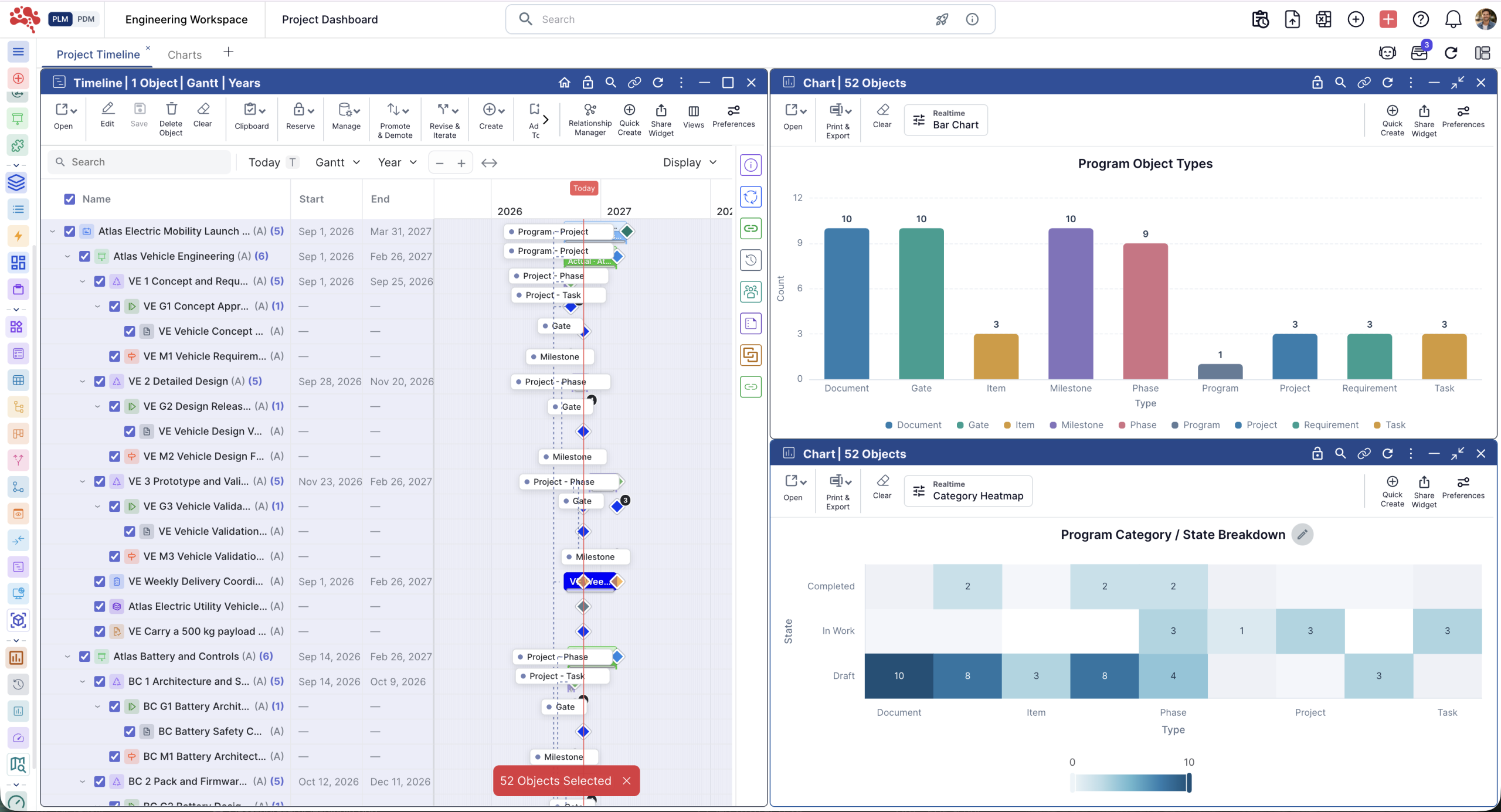
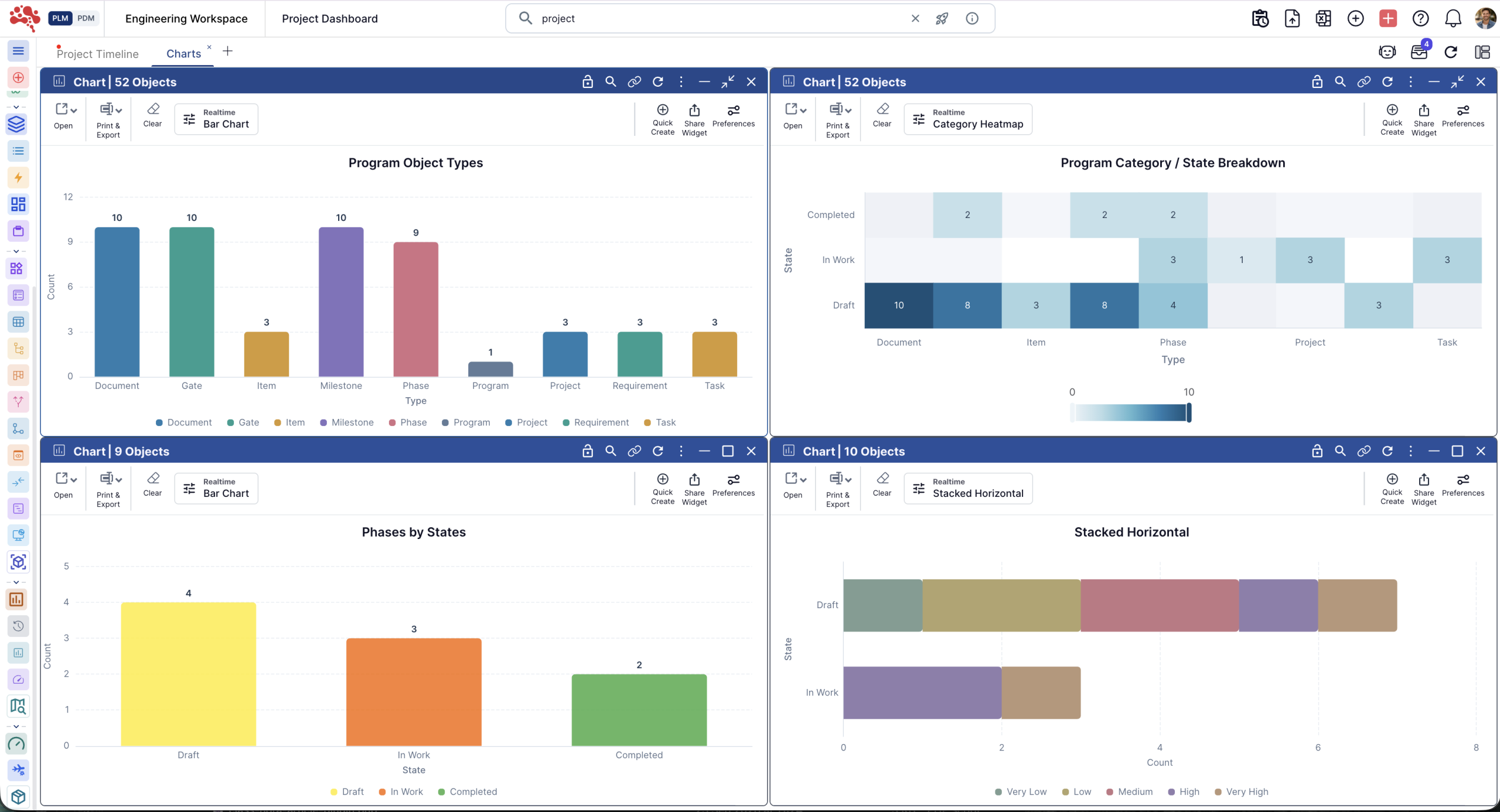
Review task completion, milestones, and open actions using connected project data. Bring delays and incomplete deliverables into the same conversation.
Plan in PLM.
Keep it connected.
Integrated project management brings the schedule and the engineering work together. In Nora IPLM, tasks stay linked to the product information and lifecycle processes they support.
The whole program.
One clear structure.
A Work Breakdown Structure turns a complex program into phases, deliverables, and tasks. Follow the hierarchy from the overall scope to the work each team owns.

Give every task
a clear place.
Break down the scope. Assign owners and due dates. Keep individual activities connected to the phase and deliverable they support.
Scope and ownership
Organize programs into phases, activities, and tasks. Use the WBS to review responsibilities and understand how each piece of work contributes to the overall project.
Follow the dependency.
Understand the impact.
See how tasks, milestones, and deliverables depend on each other. Connect them with documents, requirements, and product records.
Product data and relationships
Link project activities to BOMs, items, requirements, documents, issues, and engineering changes. Review the connected work when a dependency or deliverable changes.
Reach the milestone.
Keep the evidence.
Bring the deliverables behind each checkpoint into view. Review the product work alongside the dates before moving to the next phase.
Reviews and project visibility
Connect milestones to the engineering deliverables and review and approval workflows they depend on. Track completion, open actions, and incomplete work in the project context.
Your next project.
A proven starting point.
Reuse a project structure that already works. Clone phases, milestones, tasks, and relationships, then adapt them to the next program.
Project reuse
Start similar products, variants, or customer programs from an existing project. Review the copied scope, responsibilities, and target dates before execution.
See project cloning
Standalone project management vs. PLM.
Standalone project management
Schedules, tasks, and owners define the plan. Product deliverables may live in separate systems, so teams reconcile status across tools.
PLM-integrated project management
Tasks and milestones link to BOMs, requirements, documents, and changes. Teams review progress alongside engineering deliverables and lifecycle work.
Project management in action.
From plan to execution.
Explore the project workspace. Follow phases, tasks, milestones, and gates in the interactive tour, then take a closer look at the workflows below.
Your project.
Every step connected.
Build the structure. Follow the execution. Review the results. Keep the project plan and the work behind it in view, from the first activity to the next milestone.
Build the work breakdown structure.
Break the program into phases, deliverables, and tasks. Give every activity a clear place in the hierarchy, with the scope and ownership visible together.
Follow project progress.
Track the work as it happens. Review task completion, milestones, and open actions so teams can see where the project stands and what needs attention.
Review insights and reporting.
Bring live project information into the review. Explore connected reports to understand progress, identify delays, and discuss the product work behind each milestone.
Product development teams.
A shared direction.
Project managers, engineering, quality, and manufacturing can work from the same project context. Keep the plan connected as responsibilities move between teams.
New product development
Coordinate design, prototype, testing, and release. Link requirements, product structures, and reviews to the relevant activities.
Engineering changes
Organize the work around a product or design change. Follow the affected tasks, dependencies, and deliverables together.
Manufacturing readiness
Track the tasks and deliverables needed before approved product information moves into production.
Repeat product programs
Adapt a proven structure for a similar product, variant, or customer program. Give each team a clear starting point.
Example: a new product development program.
An industrial product program starts with design, prototype, testing, and release phases. Link each design review to its requirements, BOM, and drawings. If a component change affects prototype readiness, review the related tasks, open approvals, and deliverables before confirming the milestone.
Get to know
Project Management in PLM.
What to know before you plan your first connected project.
What is integrated project management in PLM?
It connects project planning and execution with product data, engineering work, and lifecycle processes. Teams can review schedules and tasks alongside the product information and deliverables behind them.
How is it different from a standalone project tool?
Standalone project tools primarily track schedules, tasks, and resources. PLM-integrated project management links those activities to BOMs, requirements, documents, changes, and engineering deliverables.
What is a Work Breakdown Structure?
A WBS divides a product development program into phases, deliverables, activities, and tasks. It helps teams organize scope, assign ownership, and review progress at different levels.
Can tasks be linked to product data?
Yes. Project activities can be linked to BOMs, requirements, documents, items, changes, and other lifecycle records. The product context stays connected to the planned work.
How do milestones and dependencies work together?
Milestones define checkpoints such as design reviews, prototype completion, testing, or release. Dependencies show which tasks or deliverables need to be completed before other work can progress.
Can I reuse an existing project?
Yes. Clone project structures, phases, milestones, tasks, and relationships, then adapt the copied plan to the scope, owners, and dates of the next program.
What can teams see in project reporting?
Connected project data supports visibility into task completion, milestones, open actions, and project health. Teams can review delays and incomplete deliverables in their product context.
Who is it for?
Project and program managers, engineering and product teams, PLM managers, quality, manufacturing, operations, and leadership can share visibility into project execution and product work.
Your next milestone.
A clearer way forward.
Bring the plan and the product together. Start with your own project, or explore a connected workspace in the live sandbox.
Talk to us about your project